 by admin
One Touch Smart Controls for Lighting, Sound, and Cinema Screens
August 16, 2026Are you tired of managing several remotes, changing lighting switches, and manually lowering projector screens every time you’re ready to watch a film? Managing a sophisticated home theater system typically involves an intricate sequence of steps, including activating the audio receiver, lowering the screen, adjusting the projector settings, dimming overhead lights, and selecting the appropriate audio output. When these systems function separately, minor technical glitches can become frustrating for family members and guests. One-touch smart control eliminates this issue by bringing sound, lighting, and motorized screens together through one seamless interface. In this article, we’re going to look at how one-touch smart controls work, explore custom-made scenes, discuss key control interfaces, and provide practical tips for maintaining a reliable Smart home theater with a professional home cinema service in Pakistan.
How Centralized Smart Control Works
One-touch control is operated by connecting your component of your home theatre to the central smart home automation hub. Instead of sending commands to each device, a central automation processor communicates with your home network with common control protocols, such as IP, RS-232, or Zigbee.
If you press just one button and the control processor will send automatic instructions to every linked device in a single. The central system controls the exact timing, making sure the screen is lowered as the projector heats up and the light sources slowly fade away.
Core Architecture Components
- Central Processor: This is the primary intelligent automation controller that processes user inputs and performs multi-device commands.
- Network Infrastructure High-speed wired and wireless network routing that ensures instant seamless, non-lag communication between the hardware.
- Integrated Subsystems: Dimmable lighting module motorized shade controllers A/V receivers, as well as motorized screen relays.
- User Interface Devices User Interface Devices: Customized wall touchpads handheld smart remotes that are wireless, or mobile interfaces for apps.
Creating Custom Home Theater Scenes
The main benefit of one-touch control lies in the ability to customize scene programming. A scene blends multiple functions into a single button that is specifically designed for entertainment purposes.
The Ultimate Movie Night Scene
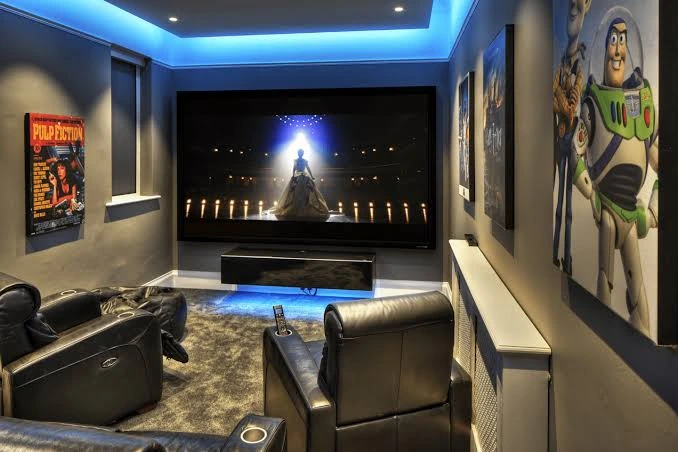
The activation of the Movie Night scene triggers a total change in the ambience of the room. Clicking the Movie Night icon lowers your motorized projection screen. It also turns on the projector in 4K and set the AV receiver in surround sound, and forwards the playback of your media to your preferred streaming device.
In the same way the overhead ambient lights dim off completely, the low-level steps lights are dimmed to 10 percent for secure moving and motorized shades for blackout lower to block out outside window light.
Intermission and Pause Automation
Smart control systems can connect directly to the media player’s pause button. When you press pause, the system can automatically increase the wall sconces to 20% brightness, allowing viewers to move safely around the room without being overwhelmed by bright overhead lighting. This seamless integration can also complement your audio distribution system for a more convenient and immersive home theater experience.
When you press play, it instantly restores darkness and resumes HD audio playback without having to switch on the light.
Multi-Purpose Media Scenes
If your space is used as a multi-purpose lounge for entertainment You can create different scenes such as Sports Gathering or Gaming Mode. A Sports theme could lower the projection screen, while keeping overhead recessed lighting at around 40 percent, allowing guests to chat and eat food and keep the action evident.
Choosing the Right Control Interfaces
An ideal automation system should be a breeze for each family member as well as guests. The installation of control interfaces that are easily accessible ensures everyone can use the theater with no technical jargon.
The smart handhelds are specially designed to combine tactile physical buttons for control of volume and transport with a touchscreen to choose lighting and media sources. Touchpads mounted on walls close to the entry points of rooms provide an easy, central control point to turn the entire system off or off when you exit or enter.
Voice control integration permits hands-free operation of basic commands like dimming the lights or pausing playback. Tablets and smartphones offer complete control from any location in or outside your home.
Sound, Lighting, and Screen Integration Best Practices
For smooth automation, you need to be careful in your setting up in the initial installation phase.
Programming gradual light dimming curves in a period of four to six seconds instead of immediate shutoffs. The gradual dimming process gives the human eye time to adjust naturally to the changing brightness of the room. Be sure that the motorized screen triggers contain safety sensors that will stop the motion if obstacles block the screen’s route.
Audio delays must be directly synchronized within the central processor to ensure that the dialogue is synchronized flawlessly, avoiding lip-sync discrepancies between different inputs to streaming.
Care and System Maintenance Guidelines
Maintaining your smart theater in good working order requires periodic system checks and software updates.
Maintain your central automation processor and router connected with the Uninterruptible Power Supply (UPS) to avoid malfunctions in configuration caused by power surges or sudden blackouts. Make sure to regularly update the control firmware and mobile apps to ensure their compatibility with the latest streaming services as well as security standards.
Review your scene settings regularly to adjust the level of lighting or to add new sources of hardware in the event that your house entertainment set-up develops over time.
Conclusion
One-touch smart control turns a complicated home theater into a simple and enjoyable entertainment zone. By bringing together lighting fixtures, surround sound processors, and motorized screens in one simple interface, you can remove technical friction and create cinematic magic with the push of a button. Following a checklist for building a custom home cinema alongside centralized scene automation can help ensure your home cinema delivers incredible comfort, contemporary style, and seamless operation every time you watch a movie